GitHub Actions
Complete CI/CD Pipeline Documentation
Two Specialized Workflows
terraform.yml
Infrastructure Deployment - Deploy and manage Azure infrastructure (VMs, Networks, Storage) with multi-environment support
Infrastructure as Code
View Workflow on GitHub
deploy-website.yml
Website Deployment - Auto-deploy HTML/CSS/JS to NGINX servers on push, with manual promotion to higher environments
Continuous Deployment
View Workflow on GitHub
Workflow 1: Infrastructure Deployment
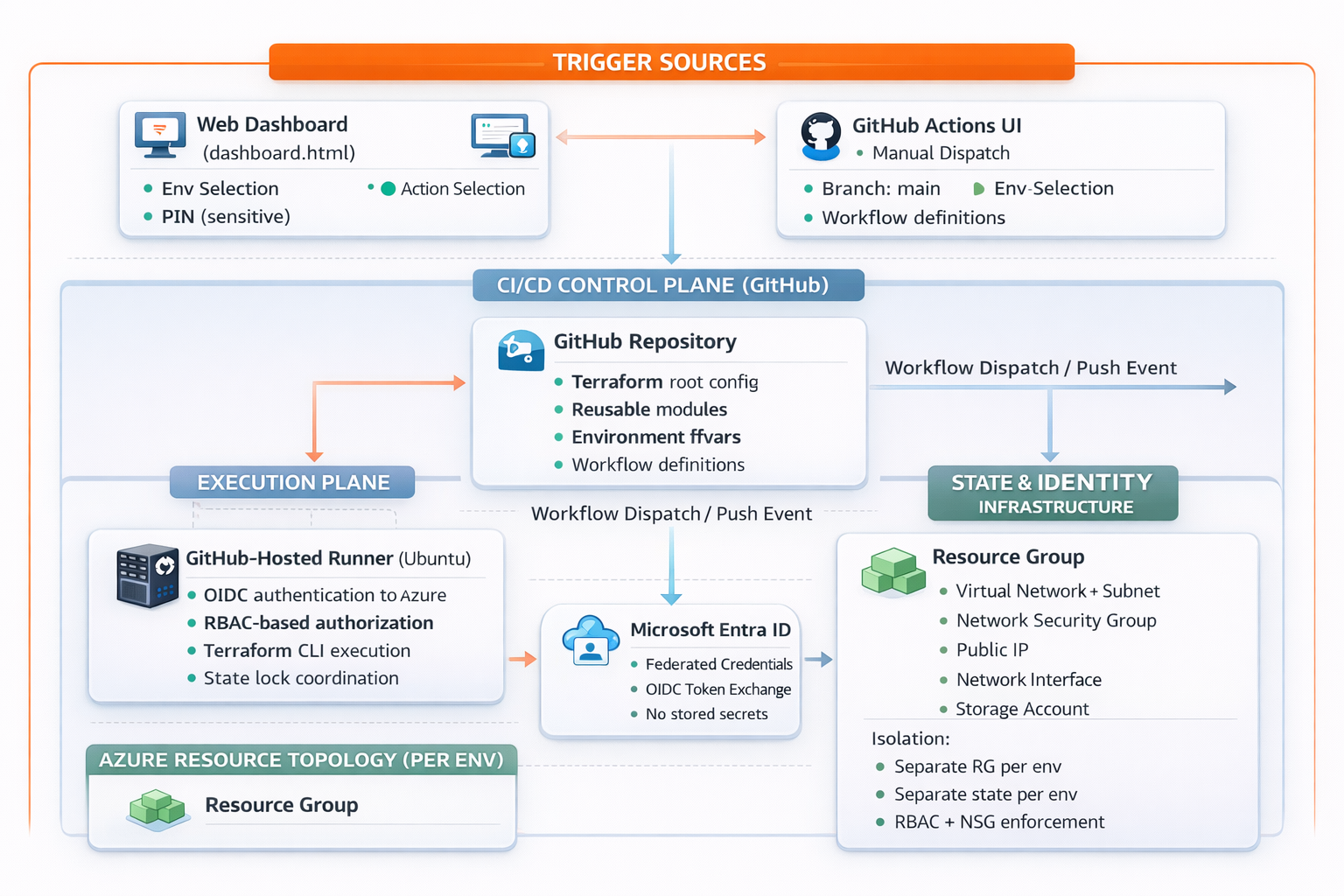
Complete Infrastructure Deployment Architecture
Security Features
- OIDC Authentication - No secrets stored
- PIN Protection via Dashboard (7925)
- State Locking with Azure Blob leases
- Environment Isolation - Separate states
- GitHub Secrets Management
Reliability Features
- Lock Detection & Wait (up to 5 minutes)
- 60-minute Timeout Protection
- Continue-on-error for lock checks
- Always-run Cleanup verification
- Reconfigure Backend every run
Operational Features
- 4 Actions: Show, Plan, Deploy, Destroy
- Environment Protection Rules
- Dashboard Integration
- Real-time Feedback & Live Logs
- GitHub Step Summary with outputs
Flexibility Features
- On-Demand Manual Execution
- Runtime Environment Selection
- Action Selection without code changes
- Branch Selection capability
- Multi-environment (Dev/QA/UAT/Prod)
Deployment Phases Breakdown
Phase 1: Initialization
Duration: 0-30 seconds
- Checkout repository (terraform/ & .github/)
- Azure OIDC Login (federated identity)
- Setup Terraform 1.6.6
- Set environment variables (ARM_*, TF_VAR_*)
Phase 2: State Management
Duration: 30-45 seconds
- Check state lock (Azure Blob lease status)
- Wait for lock release (max 5 min, 10s intervals)
- Terraform init -reconfigure
- Terraform validate (syntax & dependencies)
Phase 3: Terraform Execution
Duration: 45 seconds - 8 minutes
- Show (~30s): Display current state (read-only)
- Plan (~45-90s): Calculate infrastructure changes
- Deploy (~4-8min): Create all Azure resources
- Destroy (~3-7min): Remove all resources
Phase 4: Finalization
Always runs
- Generate GitHub step summary
- Display environment, action, and status
- Verify state lock released
- Show resource outputs (IPs, FQDNs, names)
Resources Created per Environment
- Resource Group: rg-{prefix}-{env}
- Virtual Network: vnet-{prefix}-{env} (10.0.0.0/16)
- Network Security Group: nsg-{prefix}-{env} (HTTP/HTTPS/SSH)
- Public IP: pip-{prefix}-{env} (Static with DNS)
- Storage Account: st{prefix}{env}01 (LRS, Hot tier)
- Network Interface: nic-{prefix}-{env}
- Virtual Machine: vm-{prefix}-{env} (Ubuntu 20.04 + NGINX)
Workflow 2: Website Deployment
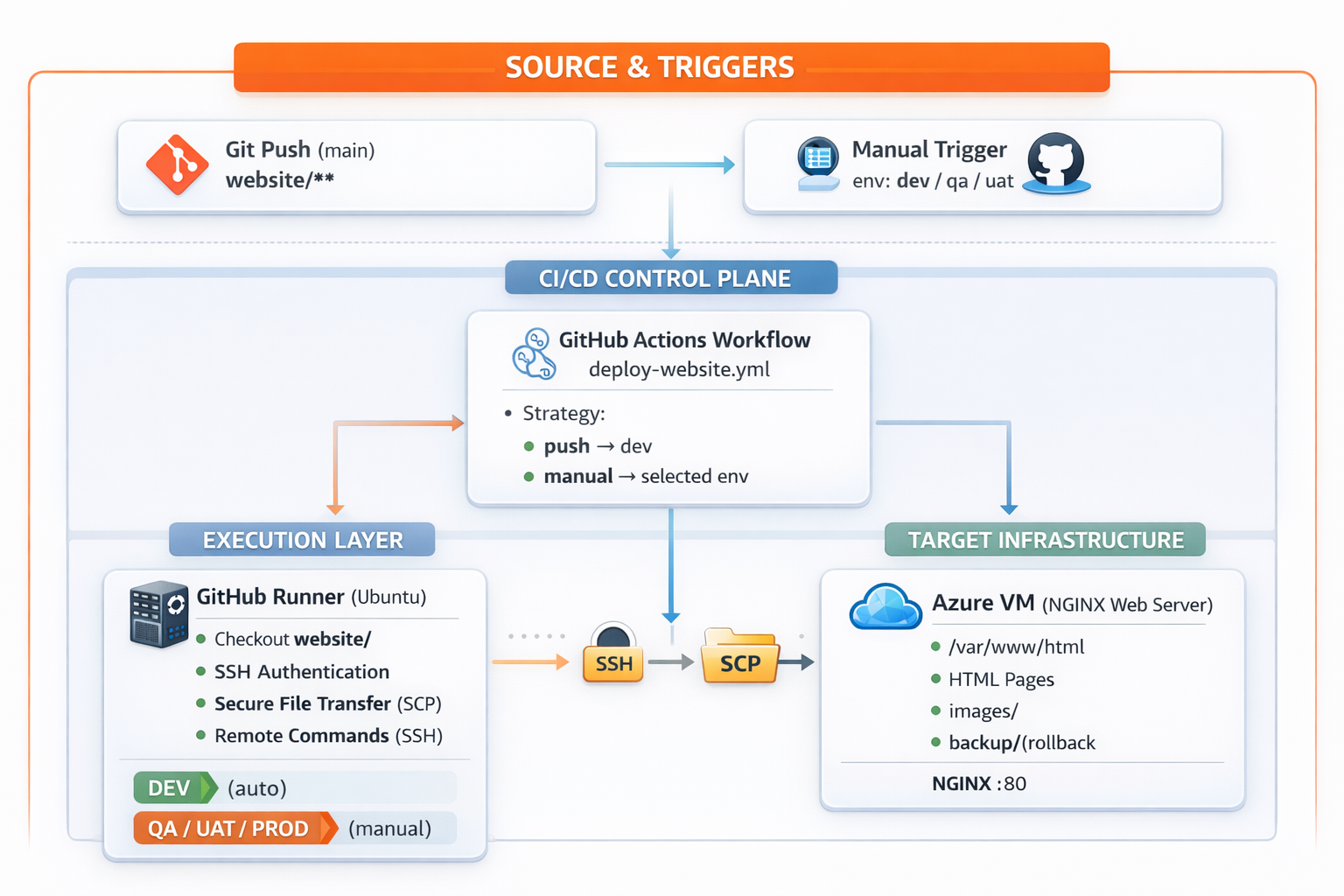
Complete Website Deployment Architecture
Automation Features
- Auto-Deploy on Push to main (DEV only)
- Path-Based Triggering (website/**)
- Smart Environment Targeting
- Zero Manual Intervention
- Fast Deployment (30-40 seconds)
Safety Features
- Automatic Backup before deployment
- Staged Deployment (tmp → final)
- Permission Management (www-data:755)
- NGINX Service Verification
- Deployment Validation checks
Deployment Features
- SSH/SCP Secure Transfer
- No Downtime (atomic file moves)
- Complete Content Sync (HTML + Images)
- Backup Retention in /backup/
- Multi-Environment Support
Monitoring Features
- Deployment Info Display
- File Verification (before & after)
- NGINX Status Check
- GitHub Step Summary with URLs
- Failure Notifications with rollback info
Deployment Phases Breakdown
Phase 1: Preparation
Duration: 0-10 seconds
- Checkout repository (website/ folder)
- Display deployment info (env, branch, commit)
- Setup SSH key (chmod 600)
- Add VM host to known_hosts
- Verify files to deploy (list HTML & images)
Phase 2: Backup
Duration: 10-15 seconds
- Create /var/www/html/backup/ directory
- Copy existing HTML files to backup
- Copy existing images folder to backup
- Purpose: Enable rollback capability
Phase 3: Deployment
Duration: 15-30 seconds
- SCP all 9 HTML files to VM /tmp/
- SCP images/ folder to VM /tmp/
- Move HTML files: /tmp/*.html → /var/www/html/
- Remove old images & move new images
- Set ownership: www-data:www-data
- Set permissions: 755
Phase 4: Verification
Duration: 30-35 seconds
- List /var/www/html/ contents
- Verify all HTML files present
- Verify images folder exists
- Check NGINX service status (active/running)
Phase 5: Summary
Duration: 35-40 seconds
- Generate GitHub step summary
- Show environment, trigger type, status
- Display server IP/hostname
- Provide access URLs for all pages
- Include deployment timestamp
Files Deployed (9 HTML Pages + 6 Images)
HTML Files:
- index.html, GitHub.html, Terraform.html
- actions.html, copilot.html, dashboard.html
- demo.html, gh-ado2gh.html, AgenticAI.html
Images:
- actions.png, dashboard.png, deploy_app.png
- deploy_infra.png, infra.png, terraform.png
Try the Dashboard
Experience these workflows in action! Use the interactive dashboard to deploy infrastructure and website with just a few clicks.
Open Dashboard